Five workspaces, one radio
The tabs below are the app's own tab bar. On a phone it sits under your thumb; here it is the tour.
Spectrum and waterfall
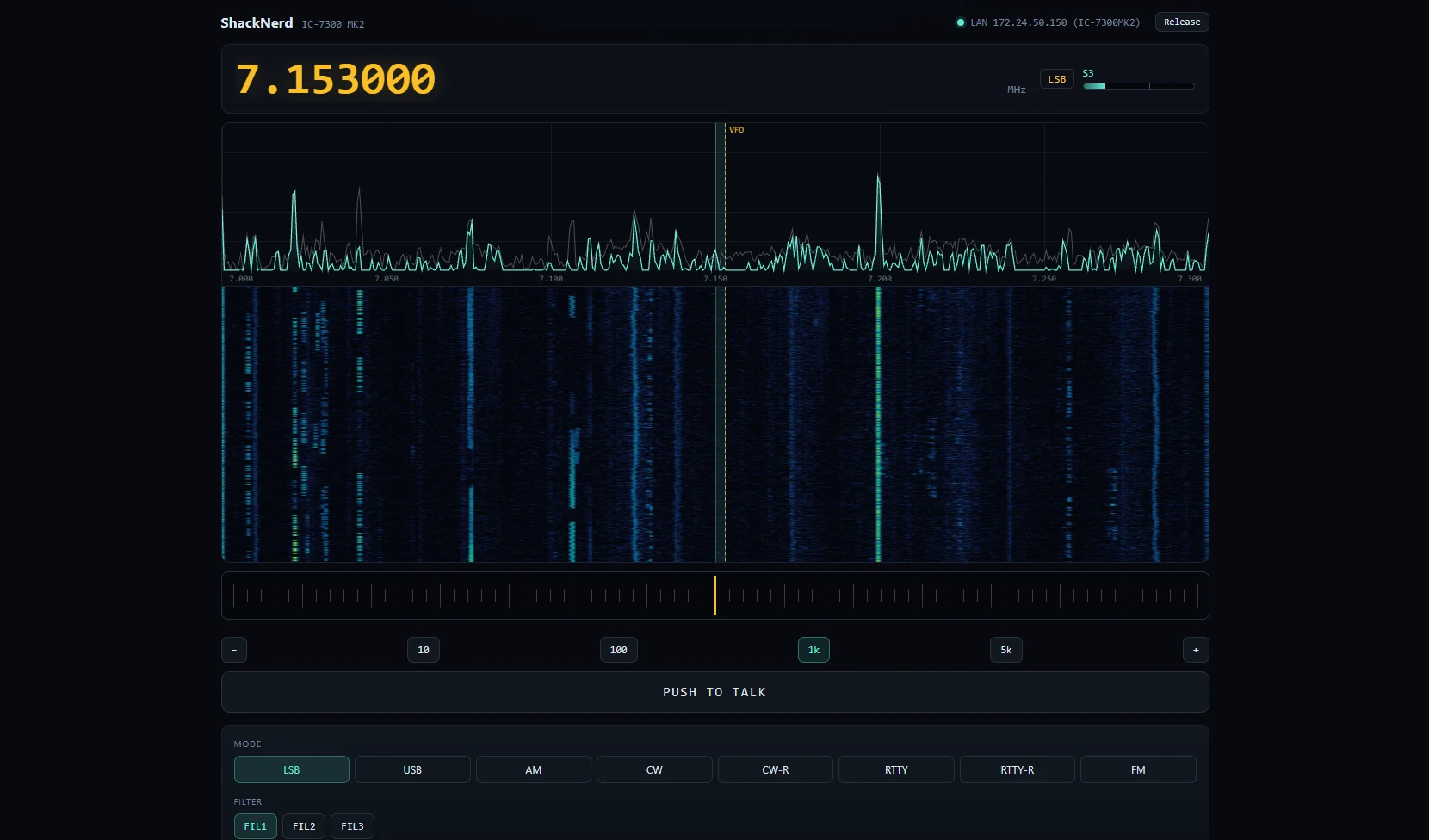
The radio's own scope over its network port, at rates USB CAT cannot reach, self-levelling so it looks right on any screen. Tap or drag to tune.
Voice from any device
Talk through your phone's microphone: slide to key on a touch screen so a pocket cannot, and a transmit watchdog that drops the key if your device goes quiet mid-over.
The band, alive
DX cluster spots laid along the waterfall at their real frequency, Parks on the Air to tap, tune and log, and an instant replay of the last thirty seconds.
The full front panel
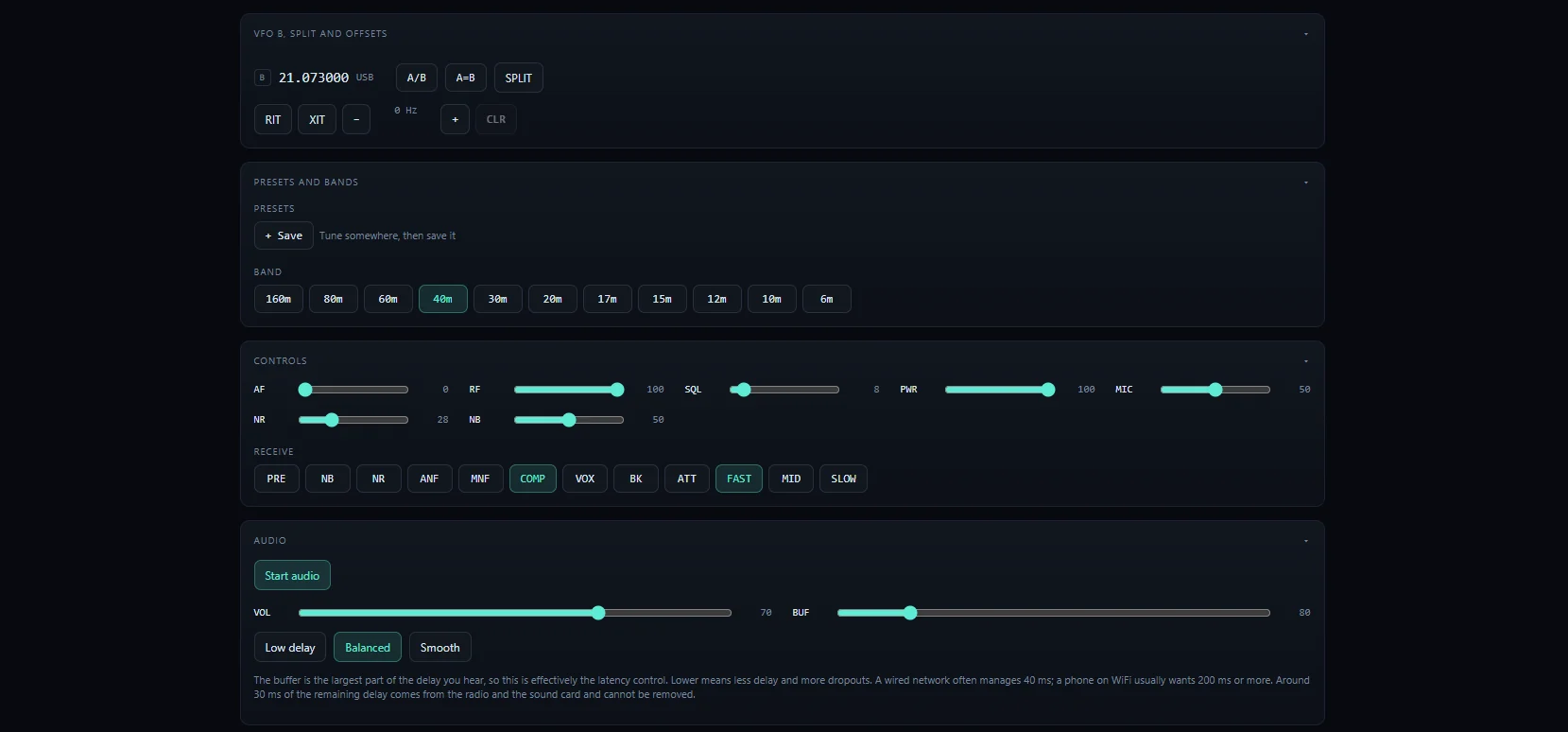
Both VFOs with split, RIT and XIT, band stacking for 160 through 6, presets, the receive chain from RF gain to notch, and contest mode with serials and dupe checks.
One tap works the contact
A native FT8 and FT4 station, no WSJT-X required: tap a CQ and the exchange runs itself into the log, grid captured. Fox/Hound for DXpeditions.
A decoder that digs
Ported from the MIT-licensed ft8_lib, then taken further with the deep techniques, until it out-decodes the library it came from.
Every decode placed
Country from the prefix, US state from the FCC rolls, distance when a grid is heard. New country, new state, new band slot: called out in the row.
Who hears you
PSK Reporter both directions, and the ShackNerd Reporter: opt in and your antenna joins the live map, while the screen answers "heard by N stations" as you call.
Keyer and decoder
Macros that load a send box for review, STOP that is never refused, and a decoder tuned against off-air recordings that follows the sender's speed.
The passband scope
A second waterfall of the few kilohertz inside your filter. Tap a trace and the radio retunes it onto your sidetone pitch.
A real trainer
Koch copy at full character speed, groups, QSO and contest scripts, a pileup simulator, a tap-to-hear reference chart, and a send half where your own radio grades your fist. Try it free.
Progress that follows you
Your trainer record syncs through the daemon, so the phone picks up at the level the desk reached, and rides the one-file backup.
Two facts per contact
The call and the report; the radio supplies the rest, and QRZ names the station as you type.
It confirms itself
Every contact goes to QRZ Logbook, eQSL and, signed through TQSL, to LoTW, by itself. Confirmations come back down daily, and the integrations strip in Settings says the last word from every service.
Your whole history
One button pulls everything from LoTW and QRZ into a single deduplicated archive, with ADIF in and out and a one-file backup.
The scoreboard
Worked All States overall and per band, the DXCC list, grid squares and best DX, with the empty cells feeding the new-state flags on the digital screen.
Find my radio
Network or USB: one button sweeps every port, every baud rate and every CI-V address, and fills the settings in by itself.
Your callsign, as an address
One click enrolls the station at a name like w2nrd.s.shacknerd.com with a real certificate that renews itself: padlock and microphone on every device, nothing installed on any of them.
Remote, done properly
Password with lockout, sessions that survive updates, HTTPS, and Tailscale for operating away from home. Port-forwarding to the radio is refused on principle.
A station people can visit
Share a view-only link the daemon enforces; club stations get a roster, a polite ask for the key, and per-operator logging.
Built like software you can live on
The banner's one button downloads, checksum-verifies and installs the next build; the page reconnects to it, still signed in.
Windows through Microsoft's signing service, macOS signed and notarized as ShackNerd.app. Five platforms from one codebase.
Opted-in stations pool what they hear at shacknerd.com/map: every path, arced in its band's colour, refreshed each minute.
Every feature documented at the guides, and one PDF of all of them for paper and long flights.
The radio, the log and the decoders never need the internet; only the name and the logbook services do, and they catch up when it returns.
ADIF in and out, a one-file backup, rigctld for WSJT-X and loggers, and protocol notes published CC BY 4.0.
The CW trainer, in your browser right now
Koch method the way it is meant to be run: characters at full speed from day one, sessions with a finish line, misses that replay until you have them, real QSO and contest scripts, statistics that name exactly which characters trip you, and streaks worth keeping. Now with a pileup simulator: up to four stations answer your CQ at once, each at its own pitch, speed and strength, the drill contest operators have run for twenty years, in your browser. Works offline once visited, and your phone will offer to install it. No radio, no signup; progress stays in your browser.
And the half no website can offer: run the same trainer inside ShackNerd with a radio attached, and its send mode listens to your rig's sidetone, break-in off so nothing transmits, and the decoder grades what your paddle actually said.
This is it, running
Straight screenshots from a browser pointed at a real IC-7300 MK2 over Ethernet. What you see is what installs.
The protocol, written down
Icom never published how the network port works. We did.
Building ShackNerd meant working out the radio's undocumented UDP protocol: the handshake, the login, the audio streams, the retransmission layer, and the corrections that only come from running against real hardware. Those notes are published here under CC BY 4.0, free for anyone to build on, in any project, under any licence.
Download and run
No installer. On Windows the download runs as it is; macOS unpacks to an app you drag to Applications; Linux to a single binary. Run it and open the address it shows in any browser on your network. Your radio's network details go in under Settings. From then on the update banner keeps you current: one click downloads, verifies and installs the next build, and the page reconnects to it.
Current build: v1.0.0, 2026-09-11 (6ed8301). The version and date are in the file name, so your downloads folder says whether you have the latest.
New here? The getting started guide goes from download to waterfall in ten minutes, and the guides cover everything else. Every build is code-signed: the Windows one through Microsoft's own signing service, the macOS ones signed and notarized by Apple. The Mac ships as ShackNerd.app, so it runs like any other app and shows in the Dock while it is going. Windows may still show its "unrecognized app" screen for a while, because SmartScreen rates publishers by how many machines have run their software and this signature is days old: click "More info", confirm the publisher reads Nicholas Dube, and "Run anyway". That screen retires itself as the count grows.
Own a radio we haven't tested? You're the whole plan.
Run ShackNerd against your radio, then in Settings choose Download a radio report. It is a read-only snapshot of how your radio describes itself: what it answers, what it refuses, and its exact scope geometry. It changes nothing, keys nothing, and carries no passwords or addresses. Send it to [email protected] and it becomes the support for your model. If ShackNerd cannot even connect, the button still works, and that report is the most valuable kind.
Your radio never touches the internet
ShackNerd runs a small program in the shack on purpose. That choice is what keeps the radio itself off the internet, and it is worth explaining.
Why is there a program in the shack at all?
Because browsers cannot speak the radio's language. Icom radios talk UDP on the network port, and no web page can open a UDP socket, so something has to sit between them. That something turns out to be where all the good stuff lives: it is why every device in the house shares one radio session, why WSJT-X plugs in with no extra cables, and why the log, the CW decoder and the transmit watchdog keep working when your phone wanders off.
Why not just forward ports to the radio, like some apps suggest?
Please don't
Some remote setups have you open UDP 50001 to 50003 on your router,
straight to the radio. Then the only thing between the whole internet
and your transmitter is the radio's built-in password, and our own
protocol notes document what
that is worth: it is scrambled with a fixed substitution table that
has been published in open source projects for years, sent with no
encryption, and the radio has no lockout against guessing. Internet
scanners find newly opened ports within hours. A transmitter deserves
better than that.
So how does remote operation work?
The radio talks only to ShackNerd, on your own network. You connect to ShackNerd, which has the defenses the radio lacks: a real password with sign-in lockout, sessions, and HTTPS set up in one click over Tailscale, so your traffic rides an encrypted WireGuard tunnel that never opens a single router port. Remote access by name refuses to even start until a password is set.
Does that mean a PC running all the time?
Anything that stays on works: the shack PC, a laptop, or a Raspberry Pi, which is what the Linux ARM build is for. ShackNerd is one small program with no database server and no runtime, so a Pi in the corner of the shack is a perfectly good home for it.
What works today
ShackNerd 1.0 is built and tested daily, on the air, against a real radio. Here is exactly where support for yours stands.
| IC-7300 MK2 | The daily driver, verified on the air every day: control, waterfall, receive and transmit audio, native FT8 and FT4 with the one-tap sequencer, CW with the trainer, logging, PSK Reporter both directions, remote operation over a tailnet. |
| Serial Icoms over USB | CI-V control plus audio through the radio's USB sound card, which lights up the waterfall, the digital modes and the CW decoder on radios with no network port. Setup has a Find my radio button that sweeps every port and fills the settings in by itself. New and looking for field testers. |
| Other network Icoms | The IC-705, IC-7610 and IC-9700 speak the same protocol and are expected to be close. Untested, because we don't own them. If you do, ShackNerd has a one-click radio report: a read-only snapshot of how your radio describes itself, safe to run and small enough to email. One report is most of what a new model needs. |
| Kenwood and Yaesu over USB | Native support has begun, no Hamlib, no virtual cables: the daemon speaks their own CAT language. Frequency, mode, PTT and the S meter work today, the port sweep recognises the radio by name, and the sound-card audio carries the waterfall, digital modes and CW decoding. Brand new and looking for owners to try it and say what their radio answers. |
| Everything else | The CW trainer is for everyone today, no radio required. |